SNAPPING service specifications
 SNAPPING requires in input catalog references to source Sentinel-1 SLC data products. The ingestion of SLC data and the Radar Product Calibration is handled as pre-processing within the service.
Service Description
The Surface motioN mAPPING (SNAPPING) service is an on-demand processor for Sentinel-1 DInSAR, integrating SNAP and StaMPS to map ground surface motion.
SNAPPING is offered through three independent services, namely the SNAPPING IFG for the generation of interferometric stacks, utilized consequently as input for the SNAPPING PSI Med and SNAPPING PSI Full services, which execute Persistent Scatterers Interferometry (PSI) analyses at medium and full resolutions, respectively
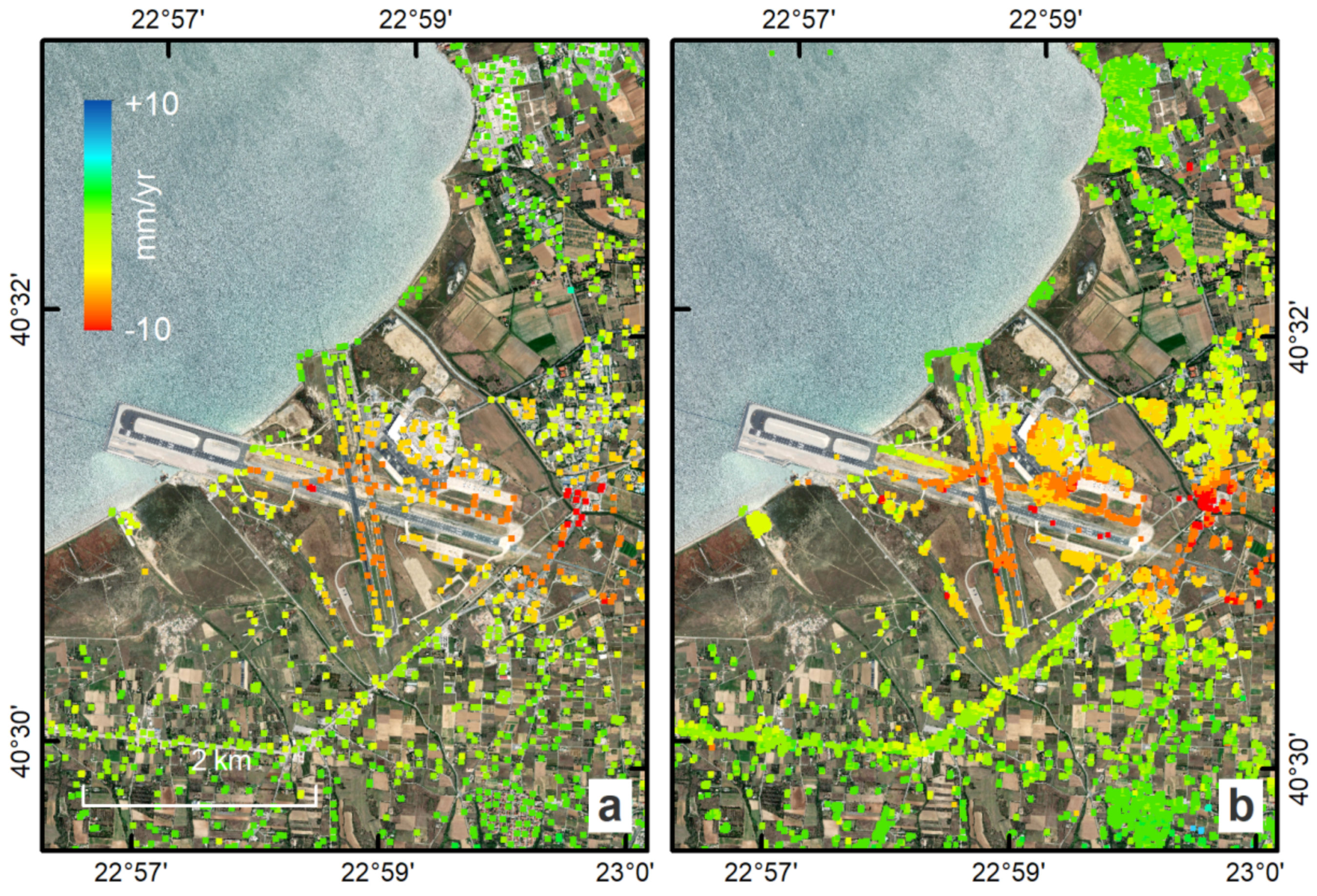
Being a PSI chain, the SNAPPING service not adequate for the investigation of large magnitude abrupt motion (e.g. earthquakes) or regions of high motion gradients (e.g. fast-moving landslides).
Advantages of SNAPPING service are:
-
No limitations in the number of Sentinel-1 acquisitions selected for processing.
-
Automatic ingestion of latest available orbit state vectors (precise or restituted).
-
Automatic assembly of multiple data takes (same orbit pass) covering the defined AOI.
-
No requirement for selecting a priori a reference area to perform the processing.
-
Automatic selection of the most recently processed SAR image (IPR version) when multiple Sentinel-1 products exist (re-processed data takes).
-
Exclusion of scenes/dates spatially not covering AOI based on user defined % of overlap.
-
The independent triggering of each interferometric pair in SNAPPING IFG ensures that unexpected failures won’t affect the entire processing job. Failed pairs are not stored in the “Interferometric Stack”, and thus, not considered in the subsequent SNAPPING PSI run.
-
Capability to expand the “Interferometric Stack” by processing newly acquired Sentinel-1 scenes and then updating the corresponding PSI solution. This facilitates an improved monitoring scheme, reducing considerably processing time and relevant costs.
Workflow
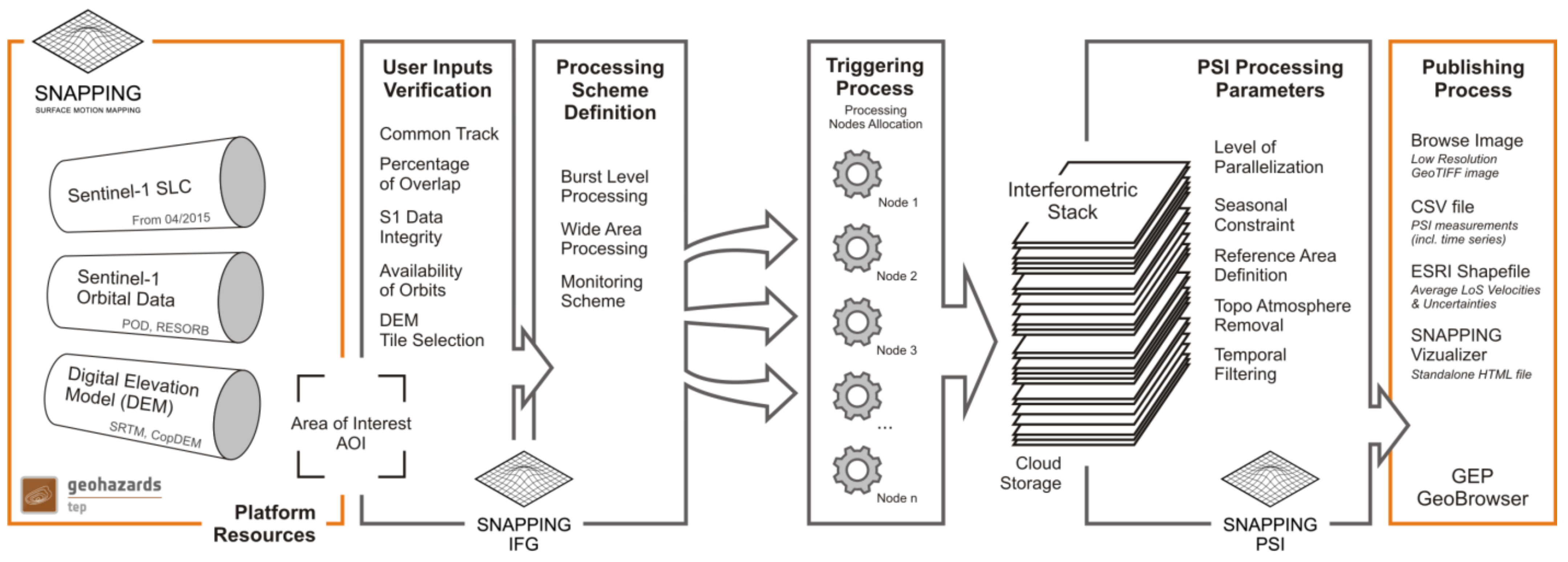
The SNAPPING service computes surface changes through a three-step chain:
-
SNAPPING IFG (creates the interferometric stack),
-
SNAPPING PSI Med (medium-resolution analysis),
-
and SNAPPING PSI Full (full-resolution analysis).
Note
The SNAPPING IFG service must be run first to create an interferometric stack, followed by either PSI Med or PSI Full.Users define an Area of Interest (AOI), with the service managing orbit corrections and image mosaicking, providing detailed long-term ground displacement.InputThe service requires Sentinel-1 IW TOPS Single Look Complex (SLC) Level-1 data, ideally covering a minimum of 80 distinct dates over three years for high accuracy.
The main user steps for the generation of the interferometric stack based on the SNAPPING IFG service are the following:
-
select the input SAR SLC data to be processed;
-
define the area of SAR data to be processed;
-
set input parameters for SNAPPING IFG processing;
-
obtain an Interferometric Stack (stored on the platform) that includes all generated differential interferograms
For the subsequent time series analysis based on the SNAPPING PSI (Med or Full) service user steps are the following:
-
select the input Interferometric Stack to be processed;
-
set input parameters/threshold (e.g. reference point) for SNAPPING PSI processing;
Upon successful execution, the results are visualized within the platform and made available for download facilitating direct interpretation and use in subsequent processing chains. SNAPPING results are: LoS Displacement time series, Mean LoS Velocity, Uncertainty of Mean LoS Velocity
SNAPPING IFG – Interferogram Generation
Service inputs
Sentinel-1 IW SLC (level 1) data
Service parameters
The SNAPPING IFG (Interferogram Generation) processing step requires the parameters described in Table 1.
| Parameter | Description | Required | Default value |
|---|---|---|---|
| Job Title | Text identifier for your job | YES | |
| Input Sentinel-1 SLC references | The input Sentinel-1 data stack | YES | |
| Interferometric Stack Directory | Target folder path where results are saved | YES | |
| Area of interest | Geographic area in WKT format (min. 20x20 km) | YES | |
| Input DEM | Digital Elevation Model type used for processing | YES | SRTM 1Sec HGT |
| AOI-based Coregistration | Flattens images based only on your chosen AOI | YES | Yes |
| Minimum Overlap Area [%] | Keeps scenes with at least this much overlap | YES | 90 |
| Exclude Seasonal Phase | Excludes specific months (e.g., to avoid snow) | NO | No |
| Start / End Season | First and last month of the excluded period | NO | Nov / Apr |
Table 1 - Service parameters for the SNAPPING IFG component.
Service outputs
Interferometric Stack; a repository where all interferometric pairs generated by SNAPPING IFG are stored for subsequent processing. These are intermediate products not available for visualization.
SNAPPING PSI – Persistent Scatterers Interferometric processing
Service inputs
Interferometric Stack identifier as generated previously by SNAPPING IFG
Service parameters
The SNAPPING PSI (Persistent Scatterers Interferometric) processing step requires the parameters described in Table 2.
| Parameter | Description | Required | Default value |
|---|---|---|---|
| Job Title | Text identifier for your job | YES | |
| Interferometric Stack Directory | The folder containing the IFG results from step 1 | YES | |
| Exclude Seasonal Phase | Excludes specific months from the PSI phase | NO | No |
| Start / End Season | First and last month of the excluded period | NO | Nov / Apr |
| Amplitude Dispersion Threshold | Selects stable points (lower values mean higher quality) | YES | 0.40 |
| Patch Number in Range / Azimuth | Splits the area into smaller tiles for processing | YES | 4 / 4 |
| Reference Radius [m] | Search radius for the reference point (Inf = full area) |
YES | Inf |
| Reference Lon / Lat | Coordinates for a known stable point | NO | 0 / 0 |
| Reference Velocity [mm/yr] | Known velocity of the reference point | NO | 0 |
| Atmospheric Filtering | Removes air distortions from the data | NO | Yes |
| Temporal / Spatial Filter [days] | Length of the window used to filter atmosphere | NO | 365 |
| Topographic Error Filtering | Filters out errors caused by bad elevation data | NO | Yes |
Table 2 - Service parameters for the SNAPPING PSI component.
Service outputs
(Default) Average LoS displacement rates; displacement rates uncertainties; Temporal coherence; LoS incidence angles; LoS displacement time series. Format: standard Comma-Separated Values (CSV) format in geographic coordinates (EPSG 4326).
Input
The service requires Sentinel-1 IW TOPS Single Look Complex (SLC) Level-1 data, ideally covering a minimum of 80 distinct dates over three years for high accuracy.
Output
The SNAPPING generates the following outputs:
-
Metadata (Properties) - processing information including details on the version of the service used, production date, EO sensor, start/end of the measurements, number of images etc. as a standard plain text file.
.txt -
Product File (CSV) - tabulated terrain motion measurements, in standard Comma-Separated Values (CSV) format.
.csv -
Product File (GZ) - standard ESRI vector file (ESRI shapefile) to be accessed with proprietary or other open source software (e.g. QGIS) (in compressed GZ format).
_shp.tar.gz -
Standalone Visualizer (HTML) - standard HTML file containing terrain motion rate measurements designed for display in common web browsers.
.html -
Browse GeoTIFF - low resolution geocoded browse image in standard GeoTIFF format.
.rgb.tif -
Browse Legend (PNG) - colour scale (as raster image) corresponding to browse image file (i.e. Filename.rgb.tif), in standard Portable Network Graphics (PNG) format.
.legend.png
SNAPPING geocoded outputs are provided in WGS 1984 coordinates (EPGS 4326).
Provided attributes within the CSV file consist of:
-
Unique pixel identifier (code);
-
WGS84 Latitude coordinates in decimal degrees (latitude);
-
WGS84 Longitude coordinates in decimal degrees (longitude);
-
Mean velocity (in mm/year), as linear regression of the displacement time series (vel);
-
Mean velocity uncertainty (in mm/year) (vs);
-
Temporal Coherence estimate (coh);
-
LoS incidence angle (in radians) (inc_angle);
-
LoS displacement time-series in millimeters (DYYYYMMDD): the naming of this field corresponds to the date as years (YYYY), months (MM) and days (DD) of each acquisition in the time series. The count of these fields depends on the number of acquisitions used in the time series analysis.
References
-
Foumelis, M. et al., “ESA SNAP - StaMPS Integrated Processing for Sentinel-1 Persistent Scatterer Interferometry,” IGARSS 2018 - 2018 IEEE International Geoscience and Remote Sensing Symposium, 2018, pp. 1364-1367, https://doi.org/10.1109/IGARSS.2018.8519545 ↩
-
Delgado Blasco, J.M.; Foumelis, M.; Stewart, C.; Hooper, “A. Measuring Urban Subsidence in the Rome Metropolitan Area (Italy) with Sentinel-1 SNAP-StaMPS Persistent Scatterer Interferometry,” Remote Sens., 2019, 11, 129, https://doi.org/10.3390/rs11020129. ↩